
Índice de contenidos
Managing unexpected issues at an event isn’t about making sure nothing ever goes wrong. Because no matter how well prepared you are, something can always happen that forces you to change the plan: a speaker cancelling that same morning, catering running late, a room suddenly becoming unavailable or the Wi-Fi deciding to fail just as the most important session begins.
And often, the problem isn’t so much the unexpected issue itself, but everything it triggers afterwards. A room change might seem minor until you realize that some attendees are still checking an outdated schedule. A speaker arriving late can be easily managed… as long as someone knows who makes the decision and which part of the programme needs to move. And an excessively long queue at the entrance can be solved by reinforcing the access points, but to do that, you need to know what’s happening at that moment.
That’s why the key isn’t trying to prevent absolutely everything, but arriving at the event with a structure in place that allows you to make fewer decisions under pressure. So, in today’s article, we’ll go through some of the most common unexpected issues at events, look at how to build a Plan B that you can actually put into action, and explore the role technology plays when you need to react quickly. Keep reading so you don’t miss anything!
What are the most common unexpected issues at an event? 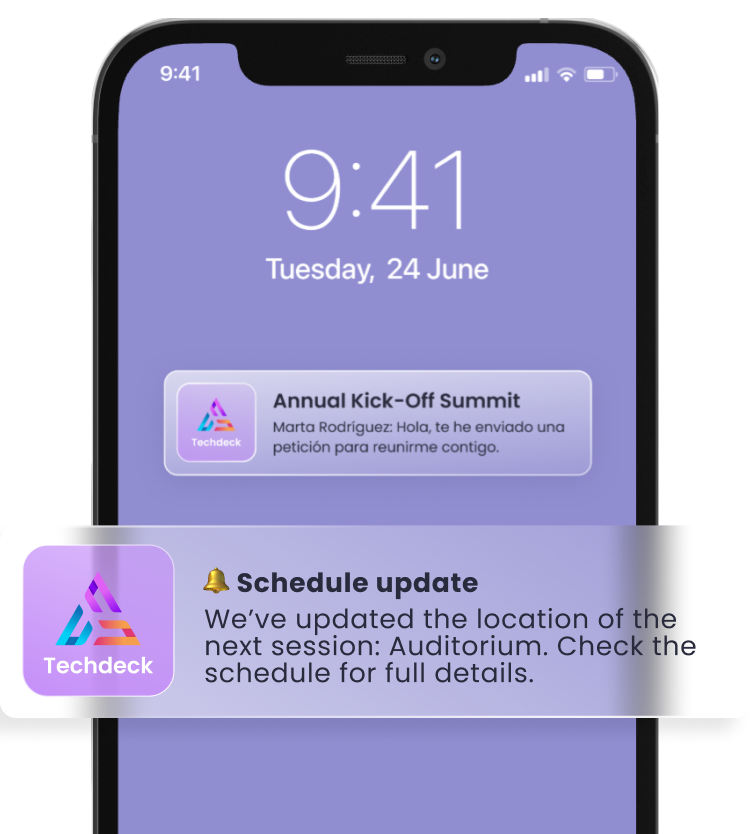
You can’t predict exactly what will go wrong, but you can identify which areas are most at risk. And doing this before the event is far more useful than creating an endless list of every possible disaster.
The most common problems tend to involve speakers, suppliers, venues, technology, catering, access or communication. In fact, we could distinguish between relatively straightforward issues, such as room changes, queues or a speaker cancellation, and higher-impact situations, such as connectivity problems, video failures, catering issues or power outages.
One way to approach it could be:
| Unexpected issue | Possible Plan B |
| Speaker cancels or arrives late | Replacement speaker, change of order or alternative session |
| Room change | Update the schedule and notify attendees |
| Catering is delayed | Rearrange the timing or activate an alternative service |
| Wi-Fi or AV equipment fails | Backup connection/equipment |
| Materials don’t arrive | Alternative supplier or digital version |
| Queues form at access points | Reinforce check-in points or redistribute staff |
The idea is to identify which situations could have a real impact and decide in advance what you would do if they happened.
💡 TIP: do this exercise by area (access, schedule, speakers, technology, suppliers, communication) and ask yourself: “What could happen here that would force us to change the plan?”
How to manage unexpected issues at an event with a good Plan B
For a Plan B to work, it needs to be something you can activate quickly. And to achieve that, there are four particularly useful questions to ask.
1️⃣ Who makes the decision?
When an issue arises, one of the things that can waste the most time is not knowing who has the authority to make the decision: “Who decides whether to move a session? Who speaks to the supplier? Who can make the change to the schedule?”
2️⃣ Where is it communicated?
The next question is just as important: which channel will be used to communicate the information?
The internal team might work through a specific operational channel (Slack, WhatsApp, walkie-talkies…), while attendees may need to receive information via email, the event app or push notifications. The important thing here is that everyone knows where to look.
In uncertain situations, good internal communication before informing attendees is particularly important: the people making the decisions first need to have all the available information and then define what needs to be communicated, when and to whom.
3️⃣ What message is sent?
As we’ve seen, there are some changes you can anticipate even if you don’t know whether they’ll actually happen: a delay, a room change, a cancellation or a schedule change.
That’s why it makes sense to prepare a few basic message templates that you can quickly adapt later. You don’t need to write them word for word in advance, but you should know what information always needs to be included: what has changed, who it affects, what the attendee needs to do and where they can find the latest information.
4️⃣ How long do we wait?
This is a particularly interesting point because, quite often, chaos doesn’t happen because there are no alternatives, but because you wait too long to activate them.
Imagine a speaker is due to start at 10:30 and, at 10:10, they still haven’t arrived. You can decide in advance: “If they’re not at the venue by 10:15, we’ll change the order of the first two sessions.” That way, when the time comes, you won’t need to debate what to do all over again. You’ll simply activate the scenario you had already planned.
🧠 Remember: the more decisions you make before the event, the less you’ll have to improvise when something changes.
How does technology help manage unexpected issues at an event?
When something changes during an event, solving the problem is only one part of the job. The other is making sure the right information reaches the people affected quickly.
And this is where technology can make a real difference. Imagine a session needs to move to another room twenty minutes before it starts. You might have the new room confirmed within five minutes, but if the change is still wrong in a PDF, the team has a different version and attendees are checking an outdated schedule, the problem still hasn’t been solved.
That’s why having event information centralized can be especially useful at moments like these. With Meetmaps, for example, you can manage the event schedule and information from the same environment and use the app to keep attendees informed. In addition, push notifications can be sent immediately or scheduled and segmented, making them particularly useful for communicating last-minute updates, schedule changes or programme changes.
This means that when an important change happens, you can update the information and notify the people who need to know directly, rather than relying solely on emails or messages that might reach them too late.
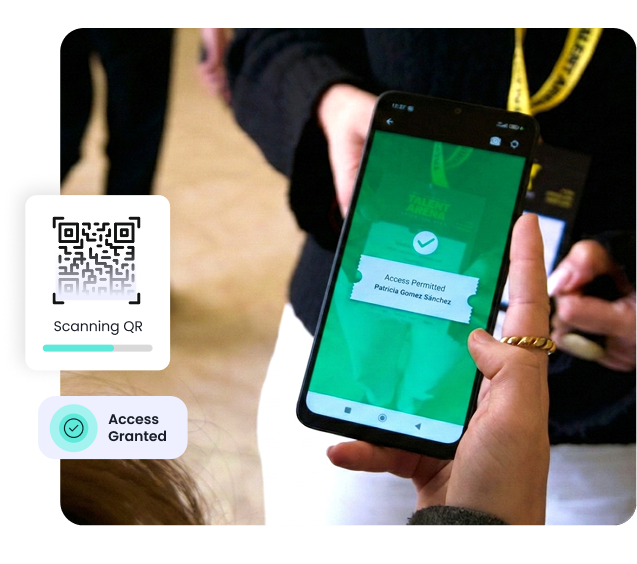
The same applies to event access. One of the most common situations on the day of an event is a sudden peak in arrivals or attendees who can’t find their QR code. The Meetmaps check-in app allows you to validate access using QR codes, search for and check in attendees manually, control entries and exits, and monitor attendance in real time, giving the team more context to react if the flow starts becoming difficult to manage.
So, unexpected issues are going to happen, but chaos doesn’t have to. A well-prepared event isn’t one where everything goes exactly according to plan, but one where the team knows how to react when the plan changes. Anticipating the most critical scenarios, defining responsibilities, setting decision points and establishing clear communication channels significantly reduces the amount of improvisation needed when every minute counts.
And when part of that operation is centralized, reacting becomes easier too. With Meetmaps, you can keep your event information connected, communicate changes through the app, update the attendee experience and access real-time attendance and access data to make better-informed decisions.
Want to manage your next event with greater visibility and less room for chaos? Talk to our team and discover how to centralize your event operations with Meetmaps. 🚀